Filters
brightness
Changes the brightness of the image.
- $value (int): The brightness level (-255 = min brightness, 0 = no change, +255 = max brightness).
This filter seems to work as expected with images that have transparency.
In the example below, the first column of images has a brightness of -100, the second column does not have any filters applied, and the third column has a brightness of 100.


$this->ce_image->make( '/images/example/cow_square.jpg',
array(
'filters' => array(
array( 'brightness', -100 )
)
)
);
echo $this->ce_image->create_tag() . ' ';
$this->ce_image->close();
$this->ce_image->make( '/images/example/cow_square.jpg',
array(
'filters' => array(
array( 'brightness', 0 )
)
)
);
echo $this->ce_image->create_tag() . ' ';
$this->ce_image->close();
$this->ce_image->make( '/images/example/cow_square.jpg',
array(
'filters' => array(
array( 'brightness', 100 )
)
)
);
echo $this->ce_image->create_tag() . ' ';
$this->ce_image->close();
//sign
$this->ce_image->make( '/images/example/cow-sign.png',
array(
'filters' => array(
array( 'brightness', -100 )
)
)
);
echo $this->ce_image->create_tag() . ' ';
$this->ce_image->close();
$this->ce_image->make( '/images/example/cow-sign.png',
array(
'filters' => array(
array( 'brightness', 0 )
)
)
);
echo $this->ce_image->create_tag() . ' ';
$this->ce_image->close();
$this->ce_image->make( '/images/example/cow-sign.png',
array(
'filters' => array(
array( 'brightness', 100 )
)
)
);
colorize
Like grayscale, except you can specify the color.
- $red (int): Value of red component (-255 = min, 0 = no change, +255 = max).
- $green (int): Value of green component (-255 = min, 0 = no change, +255 = max).
- $blue (int): Value of blue component (-255 = min, 0 = no change, +255 = max).
- $alpha (int): Alpha channel, A value between 0 and 127. 0 indicates completely opaque while 127 indicates completely transparent (PHP version 5.2.5+ for this argument)
This filter seems to work as expected with images that have transparency.
The image columns below show manipulation of the red, green, and blue color components respectively.


$this->ce_image->make( '/images/example/cow_square.jpg',
array(
'filters' => array(
array( 'colorize', 255, 0, 0, 0 )
)
)
);
echo $this->ce_image->create_tag() . ' ';
$this->ce_image->close();
$this->ce_image->make( '/images/example/cow_square.jpg',
array(
'filters' => array(
array( 'colorize', 0, 255, 0, 0 )
)
)
);
echo $this->ce_image->create_tag() . ' ';
$this->ce_image->close();
$this->ce_image->make( '/images/example/cow_square.jpg',
array(
'filters' => array(
array( 'colorize', 0, 0, 255, 0 )
)
)
);
echo $this->ce_image->create_tag() . ' ';
$this->ce_image->close();
//sign
$this->ce_image->make( '/images/example/cow-sign.png',
array(
'filters' => array(
array( 'colorize', 255, 0, 0, 0 )
)
)
);
echo $this->ce_image->create_tag() . ' ';
$this->ce_image->close();
$this->ce_image->make( '/images/example/cow-sign.png',
array(
'filters' => array(
array( 'colorize', 0, 255, 0, 0 )
)
)
);
echo $this->ce_image->create_tag() . ' ';
$this->ce_image->close();
$this->ce_image->make( '/images/example/cow-sign.png',
array(
'filters' => array(
array( 'colorize', 0, 0, 255, 0 )
)
)
);
echo $this->ce_image->create_tag() . ' ';
$this->ce_image->close();
contrast
Changes the contrast of the image.
- $value (int): The contrast level (-100 = max contrast, 0 = no change, +100 = min contrast (note the direction!)).
This filter seems to work as expected with images that have transparency.
In the example below, the first column of images has a contrast of -50, the second column does not have any filters applied, and the third column has a contrast of 50.


$this->ce_image->make( '/images/example/cow_square.jpg',
array(
'filters' => array(
array( 'contrast', -50 )
)
)
);
echo $this->ce_image->create_tag() . ' ';
$this->ce_image->close();
$this->ce_image->make( '/images/example/cow_square.jpg',
array(
'filters' => array(
array( 'contrast', 0 )
)
)
);
echo $this->ce_image->create_tag() . ' ';
$this->ce_image->close();
$this->ce_image->make( '/images/example/cow_square.jpg',
array(
'filters' => array(
array( 'contrast', 50 )
)
)
);
echo $this->ce_image->create_tag() . ' ';
$this->ce_image->close();
//signs
$this->ce_image->make( '/images/example/cow-sign.png',
array(
'filters' => array(
array( 'contrast', -50 )
)
)
);
echo $this->ce_image->create_tag() . ' ';
$this->ce_image->close();
$this->ce_image->make( '/images/example/cow-sign.png',
array(
'filters' => array(
array( 'contrast', 0 )
)
)
);
echo $this->ce_image->create_tag() . ' ';
$this->ce_image->close();
$this->ce_image->make( '/images/example/cow-sign.png',
array(
'filters' => array(
array( 'contrast', 50 )
)
)
);
echo $this->ce_image->create_tag() . ' ';
$this->ce_image->close();
edgedetect
Uses edge detection to highlight the edges in the image.
[This filter has no arguments]
Note: Transparency may be lost when using this filter (see filter transparency for more info).
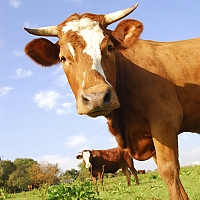
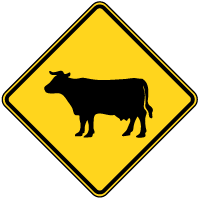
In the example below, the first column of images employs the edgedetect filter by itself, the second column has both edgedetect and grayscale filters applied, and the third column shows the images without any filters.




$this->ce_image->make( '/images/example/cow_square.jpg',
array(
'filters' => 'edgedetect'
)
);
echo $this->ce_image->create_tag() . ' ';
$this->ce_image->close();
$this->ce_image->make( '/images/example/cow_square.jpg',
array(
'filters' => array(
'edgedetect',
'grayscale'
)
)
);
echo $this->ce_image->create_tag() . ' ';
echo $this->ce_image->create_original_tag() . ' ';
$this->ce_image->close();
//signs
$this->ce_image->make( '/images/example/cow-sign.png',
array(
'filters' => 'edgedetect'
)
);
echo $this->ce_image->create_tag() . ' ';
$this->ce_image->close();
$this->ce_image->make( '/images/example/cow-sign.png',
array(
'filters' => array(
'edgedetect',
'grayscale'
)
)
);
echo $this->ce_image->create_tag() . ' ';
echo $this->ce_image->create_original_tag() . ' ';
$this->ce_image->close();
emboss
Embosses the image.
[This filter has no arguments]
Note: Transparency may be lost when using this filter (see filter transparency for more info).
In the example below, the first column of images employs the emboss filter by itself, the second column has both emboss and grayscale filters applied, and the third column shows the images without any filters.


$this->ce_image->make( '/images/example/cow_square.jpg',
array(
'filters' => 'emboss'
)
);
echo $this->ce_image->create_tag() . ' ';
$this->ce_image->close();
$this->ce_image->make( '/images/example/cow_square.jpg',
array(
'filters' => array(
'emboss',
'grayscale'
)
)
);
echo $this->ce_image->create_tag() . ' ';
echo $this->ce_image->create_original_tag() . ' ';
$this->ce_image->close();
//signs
$this->ce_image->make( '/images/example/cow-sign.png',
array(
'filters' => 'emboss'
)
);
echo $this->ce_image->create_tag() . ' ';
$this->ce_image->close();
$this->ce_image->make( '/images/example/cow-sign.png',
array(
'filters' => array(
'emboss',
'grayscale'
)
)
);
echo $this->ce_image->create_tag() . ' ';
echo $this->ce_image->create_original_tag() . ' ';
$this->ce_image->close();
gaussian_blur
Blurs the image using the Gaussian method.
[This filter has no arguments]
Note: Transparency may be lost when using this filter (see filter transparency for more info).
In the below example, the first column of images has the guassian_blur filter applied, the second has the filter applied with a background image specified (notice the favorable difference in the png image), and the final column represents the images without any filters.


$this->ce_image->make( '/images/example/cow_square.jpg',
array(
'filters' => 'gaussian_blur'
)
);
echo $this->ce_image->create_tag() . ' ';
$this->ce_image->close();
$this->ce_image->make( '/images/example/cow_square.jpg',
array(
'filters' => 'gaussian_blur',
'bg_color' => 'f0f0f0'
)
);
echo $this->ce_image->create_tag() . ' ';
echo $this->ce_image->create_original_tag();
$this->ce_image->close();
//signs
$this->ce_image->make( '/images/example/cow-sign.png',
array(
'filters' => 'gaussian_blur'
)
);
echo $this->ce_image->create_tag() . ' ';
$this->ce_image->close();
$this->ce_image->make( '/images/example/cow-sign.png',
array(
'filters' => 'gaussian_blur',
'bg_color' => 'f0f0f0'
)
);
echo $this->ce_image->create_tag() . ' ';
echo $this->ce_image->create_original_tag();
$this->ce_image->close();
grayscale
Converts the image to grayscale.
[This filter has no arguments]
This filter seems to work as expected with images that have transparency.
In the below example, the first column of images has the grayscale filter applied, and the second column represents the images without any filters.


$this->ce_image->make( '/images/example/cow_square.jpg',
array(
'filters' => 'grayscale'
)
);
echo $this->ce_image->create_tag() . ' ';
echo $this->ce_image->create_original_tag();
$this->ce_image->close();
//signs
$this->ce_image->make( '/images/example/cow-sign.png',
array(
'filters' => 'grayscale'
)
);
echo $this->ce_image->create_tag() . ' ';
echo $this->ce_image->create_original_tag();
$this->ce_image->close();
mean_removal
Uses mean removal to achieve a "sketchy" effect.
[This filter has no arguments]
Note: Transparency may be lost when using this filter (see filter transparency for more info).
In the below example, the first column of images has the mean_removal filter applied, the second column has the filter applied and specifies a background color (notice the favorable difference in the png), and the third column represents the images without any filters.


$this->ce_image->make( '/images/example/cow_square.jpg',
array(
'filters' => 'mean_removal'
)
);
echo $this->ce_image->create_tag() . ' ';
$this->ce_image->close();
$this->ce_image->make( '/images/example/cow_square.jpg',
array(
'filters' => 'mean_removal',
'bg_color' => 'f0f0f0'
)
);
echo $this->ce_image->create_tag() . ' ';
echo $this->ce_image->create_original_tag();
$this->ce_image->close();
//signs
$this->ce_image->make( '/images/example/cow-sign.png',
array(
'filters' => 'mean_removal'
)
);
echo $this->ce_image->create_tag() . ' ';
$this->ce_image->close();
$this->ce_image->make( '/images/example/cow-sign.png',
array(
'filters' => 'mean_removal',
'bg_color' => 'f0f0f0'
)
);
echo $this->ce_image->create_tag() . ' ';
echo $this->ce_image->create_original_tag();
$this->ce_image->close();
negate
Reverses all colors of the image.
[This filter has no arguments]
This filter seems to work as expected with images that have transparency.
In the below example, the first column of images has the negate filter applied, and the second column represents the images without any filters.


$this->ce_image->make( '/images/example/cow_square.jpg',
array(
'filters' => 'negate'
)
);
echo $this->ce_image->create_tag() . ' ';
echo $this->ce_image->create_original_tag();
$this->ce_image->close();
//signs
$this->ce_image->make( '/images/example/cow-sign.png',
array(
'filters' => 'negate'
)
);
echo $this->ce_image->create_tag() . ' ';
echo $this->ce_image->create_original_tag();
$this->ce_image->close();
opacity
Sets the opacity of an image. If the image is opaque, it fakes the opacity by blending it with the background color.
- $value (int): The opacity level. A value between 0 and 100. 0 is completely transparent, and 100 is fully opaque.


$this->ce_image->make( '/images/example/cow_square.jpg',
array(
'filters' => array(
array( 'opacity', 33)
),
'bg_color_default' => 'f0f0f0'
)
);
echo $this->ce_image->create_tag() . ' ';
$this->ce_image->close();
$this->ce_image->make( '/images/example/cow_square.jpg',
array(
'filters' => array(
array( 'opacity', 66 )
),
'bg_color_default' => 'f0f0f0'
)
);
echo $this->ce_image->create_tag() . ' ';
echo $this->ce_image->create_original_tag();
$this->ce_image->close();
//signs
$this->ce_image->make( '/images/example/cow-sign.png',
array(
'filters' => array(
array( 'opacity', 33 )
)
)
);
echo $this->ce_image->create_tag() . ' ';
$this->ce_image->close();
$this->ce_image->make( '/images/example/cow-sign.png',
array(
'filters' => array(
array( 'opacity', 66)
)
)
);
echo $this->ce_image->create_tag() . ' ';
echo $this->ce_image->create_original_tag();
$this->ce_image->close();
pixelate
Applies pixelation effect to the image, use arg1 to set the block size and arg2 to set the pixelation effect mode. This filter was added in PHP version 5.3.0.
- $block_size (int): Block size in pixels.
- $advanced (bool): Whether to use advanced pixelation effect or not (defaults to FALSE).
This filter seems to work as expected with images that have transparency.
In the below example, the first column of images has the pixelate filter applied with a block size of 10px and the advanced pixelation effect enabled, and the second column represents the images without any filters.


$this->ce_image->make( '/images/example/cow_square.jpg',
array(
'filters' => array(
array( 'pixelate', 10, TRUE )
)
)
);
echo $this->ce_image->create_tag() . ' ';
$this->ce_image->close();
$this->ce_image->make( '/images/example/cow_square.jpg',
array(
'filters' => array(
array( 'pixelate', 3, FALSE )
)
)
);
echo $this->ce_image->create_tag() . ' ';
echo $this->ce_image->create_original_tag();
$this->ce_image->close();
//signs
$this->ce_image->make( '/images/example/cow-sign.png',
array(
'filters' => array(
array( 'pixelate', 10, TRUE )
)
)
);
echo $this->ce_image->create_tag() . ' ';
$this->ce_image->close();
$this->ce_image->make( '/images/example/cow-sign.png',
array(
'filters' => array(
array( 'pixelate', 3, FALSE )
)
)
);
echo $this->ce_image->create_tag() . ' ';
echo $this->ce_image->create_original_tag();
$this->ce_image->close();
replace_colors
Allows you to replace a color (or color range), with a color( or transparency).
- $colors1 (string): A color hexadecimal value (ie, #fff) or a color range (ie, #fff-#f00).
- $replacement1 (string): A color hexidecimal value (ie, #fff). Leave blank ('') or FALSE to replace with complete transparency (or your bg_color/default_bg_color if saving to jpg format).
- The above arguments can be repeated continuously. Of course, at some point, the number of repetitions would be ridiculous, so use judiciously!


$this->ce_image->make( '/images/example/cow_square.jpg',
array(
'filters' => array(
array( 'replace_colors', '#fffffe-#ccc', '' ),
'bg_color_default' => 'f0f0f0'
)
)
);
echo $this->ce_image->create_tag() . ' ';
$this->ce_image->close();
$this->ce_image->make( '/images/example/cow_square.jpg',
array(
'filters' => array(
array( 'replace_colors', '999-000', 'f00' )
)
)
);
echo $this->ce_image->create_tag() . ' ';
echo $this->ce_image->create_original_tag();
$this->ce_image->close();
//signs
$this->ce_image->make( '/images/example/cow-sign.png',
array(
'filters' => array(
array( 'replace_colors', '#ffffff-#ccc', FALSE )
)
)
);
echo $this->ce_image->create_tag() . ' ';
$this->ce_image->close();
$this->ce_image->make( '/images/example/cow-sign.png',
array(
'filters' => array(
array( 'replace_colors', '#999-#000', '#f00' )
)
)
);
echo $this->ce_image->create_tag() . ' ';
echo $this->ce_image->create_original_tag();
$this->ce_image->close();
selective_blur
Blurs the image.
[This filter has no arguments]
Note: Transparency may be lost when using this filter (see filter transparency for more info).
In the below example, the first column of images has the selective_blur filter applied, the second has the filter applied and specifies a background color (notice the difference in the appearance of the png), and the third column represents the images without any filters.


$this->ce_image->make( '/images/example/cow_square.jpg',
array(
'filters' => 'selective_blur'
)
);
echo $this->ce_image->create_tag() . ' ';
$this->ce_image->close();
$this->ce_image->make( '/images/example/cow_square.jpg',
array(
'filters' => 'selective_blur',
'bg_color' => 'f0f0f0'
)
);
echo $this->ce_image->create_tag() . ' ';
echo $this->ce_image->create_original_tag() . ' ';
$this->ce_image->close();
//signs
$this->ce_image->make( '/images/example/cow-sign.png',
array(
'filters' => 'selective_blur'
)
);
echo $this->ce_image->create_tag() . ' ';
$this->ce_image->close();
$this->ce_image->make( '/images/example/cow-sign.png',
array(
'filters' => 'selective_blur',
'bg_color' => 'f0f0f0'
)
);
echo $this->ce_image->create_tag() . ' ';
echo $this->ce_image->create_original_tag() . ' ';
$this->ce_image->close();
sepia
Applies a sepia tone filter to the image.


$this->ce_image->make( '/images/example/cow_square.jpg',
array(
'filters' => 'sepia'
)
);
echo $this->ce_image->create_tag() . ' ';
$this->ce_image->close();
$this->ce_image->make( '/images/example/cow_square.jpg',
array(
'filters' => 'sepia',
'bg_color' => 'f0f0f0'
)
);
echo $this->ce_image->create_tag() . ' ';
echo $this->ce_image->create_original_tag() . ' ';
$this->ce_image->close();
//signs
$this->ce_image->make( '/images/example/cow-sign.png',
array(
'filters' => 'sepia'
)
);
echo $this->ce_image->create_tag() . ' ';
$this->ce_image->close();
$this->ce_image->make( '/images/example/cow-sign.png',
array(
'filters' => 'sepia',
'bg_color' => 'f0f0f0'
)
);
echo $this->ce_image->create_tag() . ' ';
echo $this->ce_image->create_original_tag() . ' ';
$this->ce_image->close();
sharpen
This filter sharpens the image using Torstein Hønsi’s excellent unsharp mask PHP script. When images are resized by PHP, they often appear a bit blurry. You can use this filter to sharpen the images to your taste.
- $amount (int): How much of the effect you want, 100 is 'normal.' (typically 50 to 200).
- $radius (int): Radius of the blurring circle of the mask. (typically 0.5 to 1).
- $threshold (int): The least difference in color values that is allowed between the original and the mask. In practice this means that low-contrast areas of the picture are left un-rendered whereas edges are treated normally. This is good for pictures of e.g. skin or blue skies. (typically 0 to 5).
This filter works alright with images that have transparency, but seems to look a little better when a background color is specified.
Note: This filter can be process intensive (especially with versions of PHP before 5.1). However, as with the other filters, this should only be an issue if the image is not already cached.
In the below example, the first column of images has the sharpen filter applied with the default settings, the second has the amount argument doubled in value and designates a background color (notice the favorable difference in the png image), and the last column represents the images without any filters.


$this->ce_image->make( '/images/example/cow.jpg',
array(
'filters' => 'sharpen',
'max' => 200,
'crop' => TRUE
)
);
echo $this->ce_image->create_tag() . ' ';
$this->ce_image->close();
$this->ce_image->make( '/images/example/cow.jpg',
array(
'filters' => array( 'sharpen', 160 ),
'max' => 200,
'crop' => TRUE
)
);
echo $this->ce_image->create_tag() . ' ';
$this->ce_image->close();
$this->ce_image->make( '/images/example/cow.jpg',
array(
'max' => 200,
'crop' => TRUE
)
);
echo $this->ce_image->create_tag();
$this->ce_image->close();
//signs
$this->ce_image->make( '/images/example/cow-sign.png',
array(
'filters' => 'sharpen',
'max' => 200,
'crop' => TRUE
)
);
echo $this->ce_image->create_tag() . ' ';
$this->ce_image->close();
$this->ce_image->make( '/images/example/cow-sign.png',
array(
'filters' => array( 'sharpen', 160 ),
'max' => 200,
'crop' => TRUE,
'bg_color' => 'f0f0f0'
)
);
echo $this->ce_image->create_tag() . ' ';
echo $this->ce_image->create_original_tag();
$this->ce_image->close();
smooth
Makes the image smoother.
- $value (int): Applies a 9-cell convolution matrix where center pixel has the weight $value and others weight of 1.0. The result is normalized by dividing the sum with $value + 8.0 (sum of the matrix).
Note: Transparency may be lost when using this filter (see filter transparency for more info).
In the below example, the first column of images has the smooth filter applied with a smoothness level of 1, the second is the same as the first but with the addition of a background color (notice the favorable difference in the png image), and the last column represents the images without any filters.


$this->ce_image->make( '/images/example/cow_square.jpg',
array(
'filters' => array(
array( 'smooth', 1 )
)
)
);
echo $this->ce_image->create_tag() . ' ';
$this->ce_image->close();
$this->ce_image->make( '/images/example/cow_square.jpg',
array(
'filters' => array(
array( 'smooth', 1 )
)
)
);
echo $this->ce_image->create_tag() . ' ';
echo $this->ce_image->create_original_tag();
$this->ce_image->close();
//signs
$this->ce_image->make( '/images/example/cow-sign.png',
array(
'filters' => array(
array( 'smooth', 1 )
)
)
);
echo $this->ce_image->create_tag() . ' ';
$this->ce_image->close();
$this->ce_image->make( '/images/example/cow-sign.png',
array(
'filters' => array(
array( 'smooth', 1 ),
'bg_color' => 'f0f0f0'
)
)
);
echo $this->ce_image->create_tag() . ' ';
echo $this->ce_image->create_original_tag();
$this->ce_image->close();
sobel_edgify
This is an edge detection filter that uses the sobel technique. This filter is very slow (but this will not be an issue after it is run the first time because it will be cached), so be cautious applying it to large images.
- $threshold (int): The brightness level (-255 = min brightness, 0 = no change, +255 = max brightness).
- $foreground (string|bool): Hexadecimal color value (3 or 6 digits) or ''(or FALSE) for transparent.
This filter works alright with images that have transparency, but seems to look a little better when a background color is chosen. If no background color is specified using the bg_color parameter, the background will be transparent if a png, and will default to 'ffffff' (white) if a jpg or gif. If no foreground color is specified via arg2, the foreground color will be transparent if a png and black otherwise.
Note: If you do not specify a foreground color (arg2), and do not specify a background color via the bg_color parameter, you may get a blank a completely blank image.
Note: This filter can be process intensive. However, as with the other filters, this should only be an issue if the image is not already cached.
In the below example, the first column of images has the sobel_edgify filter applied with a threshold of 40 and the f6861f foreground color with a transparent background, the second has the threshold argument set to 60 in value and designates a background color with a transparent foreground, and the last column represents the images without any filters.


$this->ce_image->make( '/images/example/cow_square.jpg',
array(
'filters' => array(
array( 'sobel_edgify', 40, 'f6861f' )
),
'save_type' => 'png'
)
);
echo $this->ce_image->create_tag() . ' ';
$this->ce_image->close();
$this->ce_image->make( '/images/example/cow_square.jpg',
array(
'filters' => array(
array( 'sobel_edgify', 60, '' )
),
'save_type' => 'png',
'bg_color' => '00a6e7'
)
);
echo $this->ce_image->create_tag() . ' ';
echo $this->ce_image->create_original_tag();
$this->ce_image->close();
//signs
$this->ce_image->make( '/images/example/cow-sign.png',
array(
'filters' => array(
array( 'sobel_edgify', 40, 'f6861f' )
)
)
);
echo $this->ce_image->create_tag() . ' ';
$this->ce_image->close();
$this->ce_image->make( '/images/example/cow-sign.png',
array(
'filters' => array(
array( 'sobel_edgify', 60, '' )
),
'bg_color' => '00a6e7'
)
);
echo $this->ce_image->create_tag() . ' ';
echo $this->ce_image->create_original_tag();
$this->ce_image->close();
How To Apply Multiple Filters Simultaneously
Filters can also be stacked to create cool effects!
In the example below, the first column of images has two filters (grayscale and negate) applied to achieve an “x-ray” effect, the second column of images has two filters applied (pixelate, sobel_edgify), and the third column represents the images without filters.


$this->ce_image->make( '/images/example/cow_square.jpg',
array(
'filters' => array(
'grayscale',
'negate'
)
)
);
echo $this->ce_image->create_tag() . ' ';
$this->ce_image->close();
$this->ce_image->make( '/images/example/cow_square.jpg',
array(
'filters' => array(
array( 'pixelate', 2 ),
array( 'sobel_edgify', 10, '#000' )
),
'save_type' => 'png'
)
);
echo $this->ce_image->create_tag() . ' ';
echo $this->ce_image->create_original_tag();
$this->ce_image->close();
//signs
$this->ce_image->make( '/images/example/cow-sign.png',
array(
'filters' => array(
'grayscale',
'negate'
)
)
);
echo $this->ce_image->create_tag() . ' ';
$this->ce_image->close();
$this->ce_image->make( '/images/example/cow-sign.png',
array(
'filters' => array(
array( 'pixelate', 2 ),
array( 'sobel_edgify', 10, '#000' )
),
'save_type' => 'png'
)
);
echo $this->ce_image->create_tag() . ' ';
echo $this->ce_image->create_original_tag();
$this->ce_image->close();
If A Filter Does Not Work
If you pass in a filter and it does not work, your version of PHP probably does not support that filter. All filters require PHP 5+, the colorize filter needs version 5.2.5 for the last argument to work (alpha level), and the pixelate filter was added as of PHP 5.3.0.
If Background Transparency Is Lost When Using Filters
Do the image alpha channels turn black or dark gray when applying filters? This can sometimes happen when applying filters to png images, depending on your PHP version and configuration. Background transparency seems to work well when using PHP versions 5.2.11 and newer.
We have tried to document which filters seem to be problematic with transparency on PHP versions before 5.2.11. In particular, these filters can sometimes cause the alpha channel to be lost: edgedetect, emboss, gaussian_blur, mean_removal, selective_blur (not completely black, just some weird artifacts around edges), and smooth. Setting the background color to be the same color as your html background color may be a work around for the following filters: gaussian_blur, mean_removal, selective_blur, and smooth.
All of the image filters should still work on images with no transparency (assuming you have the appropriate version of PHP installed for the respective filter).
Where To Learn More
See http://php.net/manual/en/function.imagefilter.php for more details on PHP image filters.